Front office
Payers, Plans & Memberships
Who pays for what: payers (insurers, TPAs, companies, the national scheme), their plans with coverage rules and co-payments, and each patient’s membership with a member number and validity. The bill splits itself between payer and patient from these rules.
For:ReceptionInsurance deskCashier
Where:Insurance › Payers & Plans · Memberships
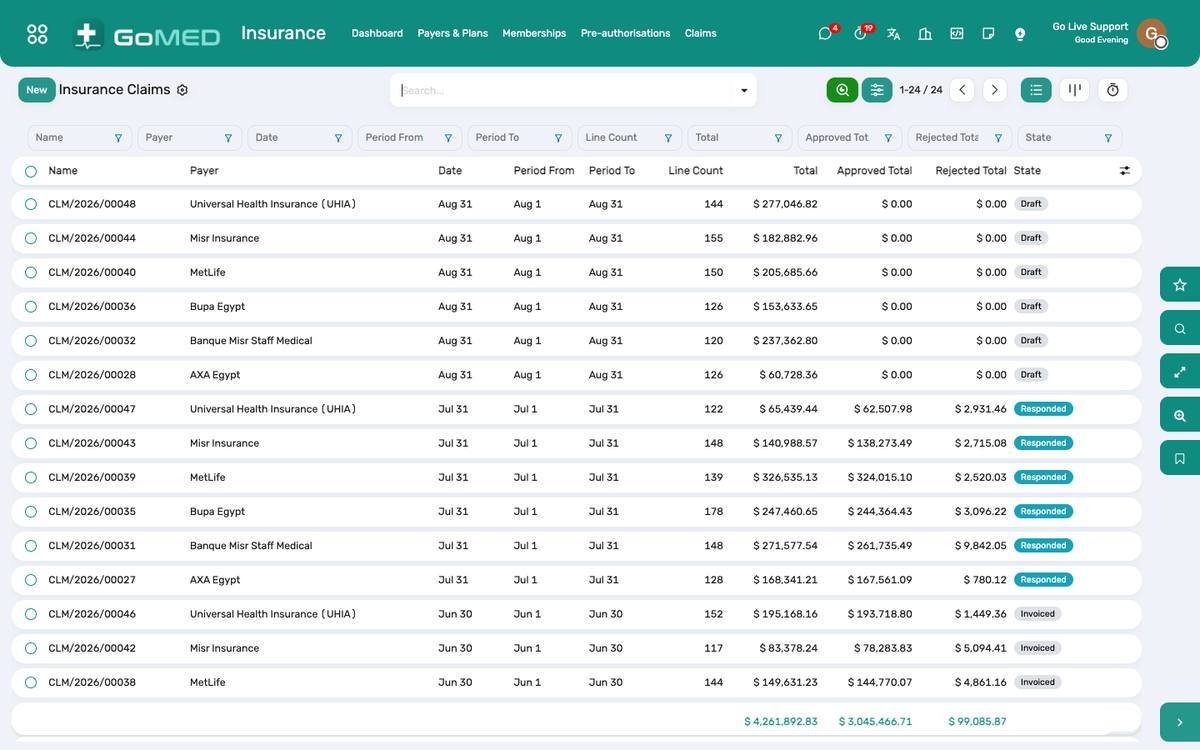
Claim batches per payer, with their status.
How to
Add a payer and a plan
- Insurance › Payers & Plans › New payer: name, type, contact, contract dates, pricelist (the tariff).
- Add plans under the payer: coverage percentage, co-payment, the services excluded, whether pre-authorisation is required and above what amount.
Attach a membership to a patient
- On the patient form › Insurance tab › Add: payer, plan, member number, valid from/to, the card scan under Documents.
- One patient can hold several memberships; the one marked primary is proposed on new visits.
Check coverage at the desk
- Open the visit; the Payer field shows the membership used and its validity.
- An expired membership is red; switch the visit to self-pay or to another membership before charging.
See also: Patients & Registration Bills, Charges & Cashier Pre-authorisation, Claims & Doctor Fees