Patients online
Help Desk
Complaints, suggestions and requests from patients (portal, app, WhatsApp) and staff (app, back office), with teams, SLA targets, stages and a hand-off to the Maintenance app for anything that needs a technician.
For:Patient relationsMaintenanceAll staff
Where:Help Desk › Tickets
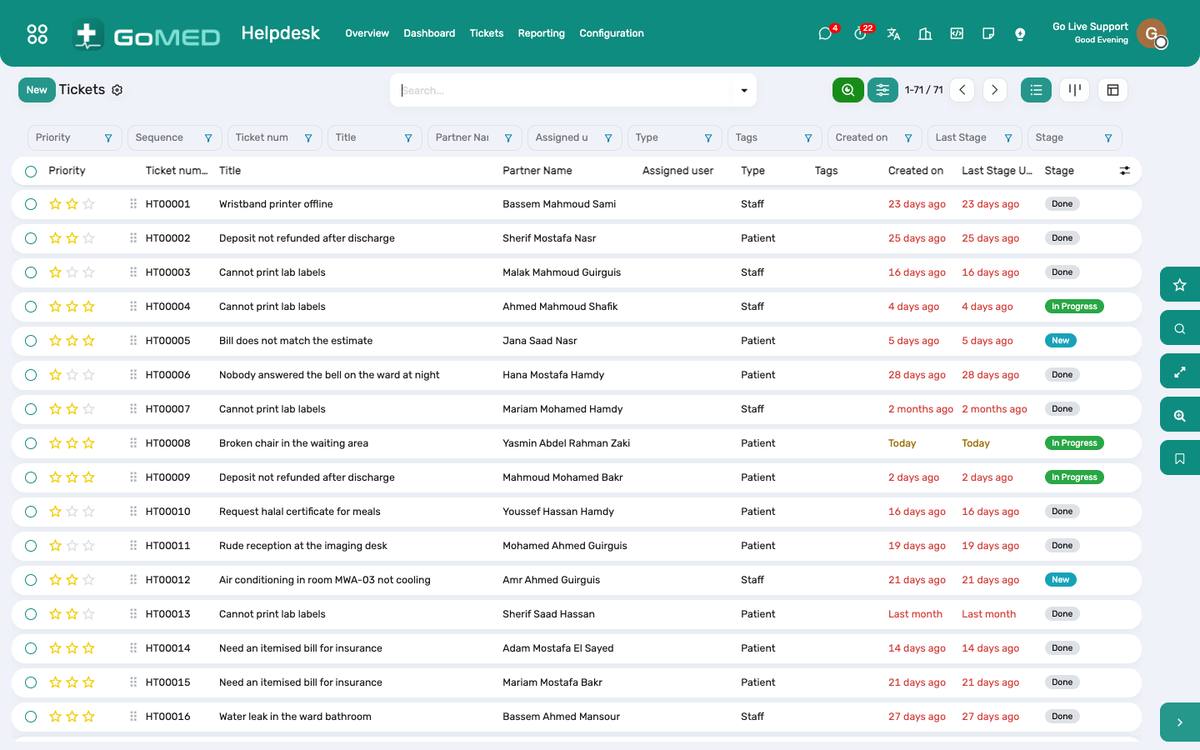
Tickets by team and stage, with the SLA.
How to
Log and work a ticket
- Help Desk › Tickets › New (or it arrives from the portal, the app or WhatsApp): the person, the type, the description; assign a team.
- Move it through the stages; reply from the chatter (the patient sees replies on the portal and in the app); close with the resolution.
Send a ticket to maintenance
- On the ticket, Create maintenance request: the equipment or the location, the priority; the technician works it in Maintenance and the ticket closes when it is done.
Watch the SLA
- Help Desk › Dashboard: open tickets, breached SLAs, satisfaction; per team and per type.
See also: Patient Portal Mobile App (patients and staff) Purchasing, Stock & Maintenance